


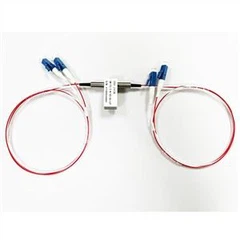
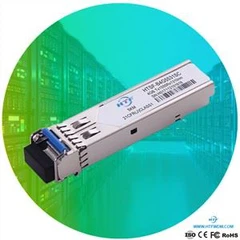


Optical fiber jumpers are widely used equipment connection accessories in the field of optical communications, and their role in optical fiber transmission wiring cannot be underestimated. Therefore, understanding the necessary usage methods and precautions is an indispensable step, which helps to ensure high-quality optical fiber transmission quality and enhance optical fiber durability.
Optical fiber jumper connection steps
1.Remove the dust caps on the connectors at both ends of the optical module and fiber jumper, and save them for later use.
2.Correctly insert the jumper connector into the module.
3.Use cable ties to tighten and fix the optical fiber cable, and shape it to protect the jumper.
Optical fiber jumper disconnection steps
1.Run the command to close the switch port where the optical module is inserted.
2.Carefully pull out the fiber jumper connector from the module.
3.Cover the connectors at both ends of the fiber jumper and the optical module interface with dust caps.
Precautions:
● Installers need to have sufficient technical knowledge and experience in network wiring to ensure installation quality and safety.
● Always wear protective gloves and anti-static wristbands when handling active devices to prevent damage from fiber fragments and static electricity.
● Make sure that the end face of the optical fiber connector is clean before use.
● Pay attention to the bend radius of the fiber jumper when using it. Excessive stretching or squeezing may cause loss.
● Do not allow the jumper to be suspended or placed freely from the device to prevent breakage when the jumper is accidentally pulled.
● Avoid frequently inserting or removing jumpers in the device to reduce wear.
● When connecting, do not look directly at the end face of the jumper connector to prevent laser eye injury.
● After installation, the work area should be cleaned thoroughly.
Optical fiber jumper maintenance method
Although the use of optical fiber jumper is simple, its daily maintenance work cannot be ignored. Proper cleaning and maintenance not only ensure smooth signal transmission, but also extend the service life of the optical fiber to a certain extent.
Clean the fiber jumper in time
Why is fiber patch cord cleaning so important? Once the optical fiber is contaminated by dust, oil stains and other substances, the quality of optical signal transmission is greatly compromised. In addition, the metal particles produced by the abrasion of the connector body and the fiber shell may also block the fiber, causing signal loss and causing loss to users. Therefore, it can be said that optical fiber jumpers are actually very "fragile", and timely cleaning is essential.
Generally speaking, fiber patch cord cleaning is mainly for the connectors at both ends. There are two main cleaning methods, namely dry cleaning and wet cleaning. There is a slight difference between the two and can be used together. Commonly used dry cleaning tools include cassette-type fiber optic cleaning boxes and one-touch cleaning pens, and wet cleaning tools include dust-free wipes and cleaning sticks.
Reasonably store optical fiber jumpers
Regardless of whether the optical fiber jumper is in use, do not bend or stretch it excessively. To avoid further losses, when the jumper must be replaced, the following factors should be considered:
● Do not bend the fiber jumper beyond its minimum bending radius, especially in the narrow space of high-density fiber wiring.
● Use appropriate tools to redesign the fiber jumper path to protect the cables from damage, such as horizontal cable management racks.
● Do not hit the optical fiber connector, otherwise the end face may be worn away, and the fragments will pierce the skin. Therefore, it is recommended to put a dust cap on the jumper at any time.
● If equipment is required to detect and identify faults, such as damage and full attenuation inside the fiber jumper, optical time domain reflectometer (OTDR) and fiber microscope can be used.
How to use fiber patch cords correctly?
1. Both ends of the fiber jumper must be optical modules of the same wavelength. The simple way to distinguish is that the colors of the optical modules should be the same.
2. In general, short-wave optical modules use multimode fibers (usually orange), and long-wave optical modules use single-mode fibers (usually yellow) to ensure the accuracy of data transmission.
3. Do not over-bend and loop the optical fiber during use, which will increase the light attenuation during transmission. The minimum bending radius of the optical fiber is less than 30mm during use.
4. After using the fiber jumper, be sure to use a protective cover to protect the fiber connector. Dust and oil will damage the coupling of the fiber.
5. If the fiber connector is dirty, you can use a cotton swab dipped in absolute alcohol to clean it, otherwise it will affect the communication quality.
6. The ceramic ferrule and end face of the fiber jumper must be wiped clean with alcohol and absorbent cotton before use.
7. Protect the ferrule and the end face of the ferrule to prevent bumps and pollution. Wear a dust cap in time after disassembly.
8. Do not look directly at the end face of the optical fiber while transmitting the laser signal.
9. When there is damage caused by man-made or other force majeure, the damaged fiber jumper should be replaced in time.
10. Or further use a precision optical fiber insertion loss return loss tester to test its various indicators. If the indicators are within the qualified range, the jumper indicator is normal, otherwise it is unqualified.
How to manage and maintain fiber optic patch cords?
1. Pay attention to the bending radius of the fiber jumper. Generally speaking, the bending radius of 1.6mm and 3.0mm fiber patch cords cannot be less than 3.5cm, while the bending radius of MPO fiber patch cords cannot be less than 10 times its diameter.
2. Do not pull or squeeze the fiber jumper. When installing an optical fiber jumper, excessive force may put pressure on the optical fiber jumper and the connectors at its ends, thereby affecting its performance.
3. Route the jumper according to the path of the fiber jumper. If the length of the existing jumper is in line with the current application, you can reuse this jumper. However, you still need to remove the jumper from the optical fiber distribution frame, and then reinstall the jumper according to the new path. line.
4. Using bundles or ties to manage the fiber optic patch cords can make the panel look neat and tidy, but if you bundle or tie the fiber optic patch cords too tightly, it will increase the risk of excessive extrusion.
5. Labeling is a necessary task and one of the most important tasks for network system administrators. It is necessary to correctly label any management points (including wiring panels) of the network cabling infrastructure.
6. Check whether the fiber jumper has physical damage, including indentation caused by sudden bending of the sheath and connector damage.
HTF's products quality is guaranteed, and the accessories are imported.
Contact: support@htfuture.com
Skype :sales5_ 1909,WeChat :16635025029