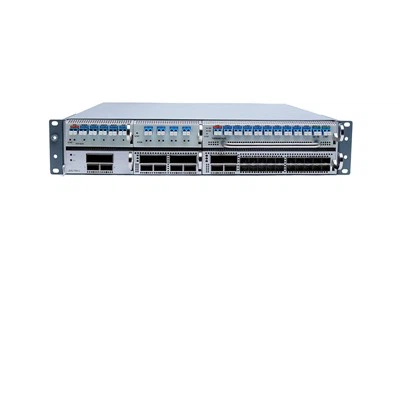





Optical fiber transceiver can easily integrate copper based cabling system into optical fiber cabling system, which has strong flexibility and high cost performance. In general, they can convert electrical signals into optical signals (and vice versa) to extend the transmission distance. So, how to use fiber optic transceiver in the network and connect it to switch, optical module and other network equipment correctly?
How to use fiber optic transceiver?
Nowadays, optical fiber transceiver has been widely used in all walks of life, including security monitoring, enterprise network, campus LAN, etc. Optical fiber transceivers are small in size and space, so they are very suitable for deployment in wiring room, chassis and other places with limited space. Although the application environments of optical fiber transceivers are different, the connection methods are essentially the same. The following describes the common connection methods of optical fiber transceivers.
Used alone
Usually, fiber optic transceivers are used in pairs in the network, but sometimes they need to be used separately to connect copper cables to fiber optic devices. As shown in the figure below, the optical fiber transceiver with one SFP port and one RJ45 port is used to connect two Ethernet switches. The SFP port on the optical fiber transceiver is used to connect with the SFP port on switch a, and the RJ45 port is used to connect with the electrical port on switch B. the connection method is as follows:
1. Connect the RJ45 port of switch B with the electrical port on the optical fiber transceiver by using UTP cable (network cable above CAT5).
2. Insert the optical module of the SFP into the SFP port of the fiber transceiver, and then insert another optical module of the SFP into the SFP port of the switch A.
3. Insert the optical jumper into the optical transceiver and the optical module of switch A.

Use in pairs
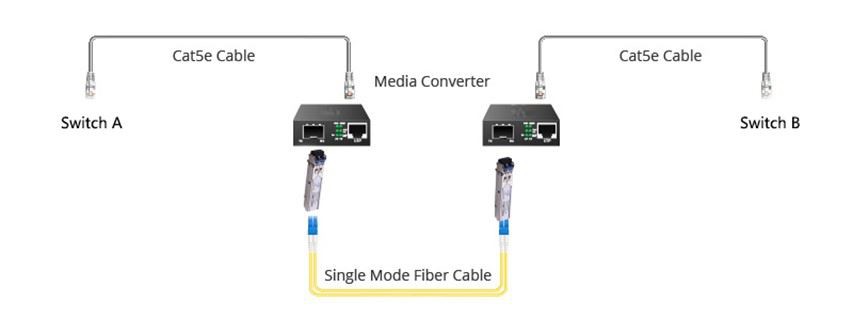
A pair of fiber optic transceivers is usually used to connect two network devices based on copper cabling together to extend the transmission distance. This is also a common solution to use fiber optic transceivers in the network. The steps of how to use a pair of optical fiber transceivers with network switches, optical modules, optical fiber jumpers and copper cables are as follows:
1. Use UTP cable (network cable above Cat5) to connect the electrical port of switch a with the RJ45 port of the left optical transceiver.
2. Insert one optical module into the SFP port of the left optical transceiver, and then insert another optical module into the SFP port of the right optical transceiver
3. Connect two optical fiber transceivers with optical fiber jumper.
4. Use UTP cable to connect the RJ45 port of the right optical transceiver with the electrical port of switch B.
Precautions for using optical fiber transceiver
Fiber optic transceivers are plug and play devices. When connecting them with other network devices, some factors should be considered. It is better to choose a flat and safe location to deploy the fiber transceiver, and also need to leave some space around the fiber transceiver for ventilation.
1.The wavelength of the optical module inserted into the optical transceiver should be consistent. In other words, if the wavelength of the optical module on one end of the optical transceiver is 1310nm or 850nm, the wavelength of the optical module on the other end of the optical transceiver should also be consistent. At the same time, the rate of optical transceiver and optical module must be the same: gigabit optical module must be used with gigabit optical transceiver. In addition, the types of optical modules on fiber optic transceivers used in pairs should also be the same.
2.The jumper inserted into the optical fiber transceiver needs to match the port of the optical fiber transceiver. Generally, SC optical fiber jumper is used to connect the optical fiber transceiver with the SC port, while LC optical fiber jumper needs to be inserted into the sfpgsfp + port of the optical fiber transceiver.
3.It is necessary to confirm whether the optical transceiver supports full duplex or half duplex transmission. If the optical fiber transceiver supporting full duplex mode is connected with the switch or hub supporting half duplex mode, it will cause serious packet loss.
4.The working temperature of optical fiber transceiver needs to be kept in a proper range, otherwise the optical fiber transceiver will not work. The parameters of optical fiber transceivers from different suppliers may be different.
How to remove and solve the fault of optical fiber transceiver?
The use of optical fiber transceiver is very simple. When the optical fiber transceiver is applied to the network, if it can't work normally, it needs troubleshooting, which can be eliminated from the following six aspects:
1. The power indicator is not on, and the optical transceiver cannot communicate.
2. The sys indicator on the optical transceiver is not on.
3. The sys indicator on the fiber transceiver is flashing all the time.
4. The network between RJ45 port on optical fiber transceiver and terminal equipment is slow.
5. There is no communication between the equipment connected with the optical transceiver.
6. Time on and time off
HTF's products quality is guaranteed, and the accessories are imported.
Contact: support@htfuture.com
Skype :sales5_ 1909,WeChat :16635025029